Use AI with your trading account without giving away your account numbers
AI is good at reading a brokerage statement, sanity-checking a hedge or explaining what an options chain is telling you. It doesn't need your account number, your name or your SSN to do any of that.
What traders paste into AI
- Positions copied out of Schwab, Fidelity, Robinhood, E*TRADE, Interactive Brokers or Questrade, to ask "am I too concentrated?"
- A monthly or tax statement, to ask what a fee, a wash sale or a cost-basis adjustment means.
- Questions about which account to hold something in: taxable, Roth IRA, traditional IRA, 401(k), or a TFSA or RRSP in Canada.
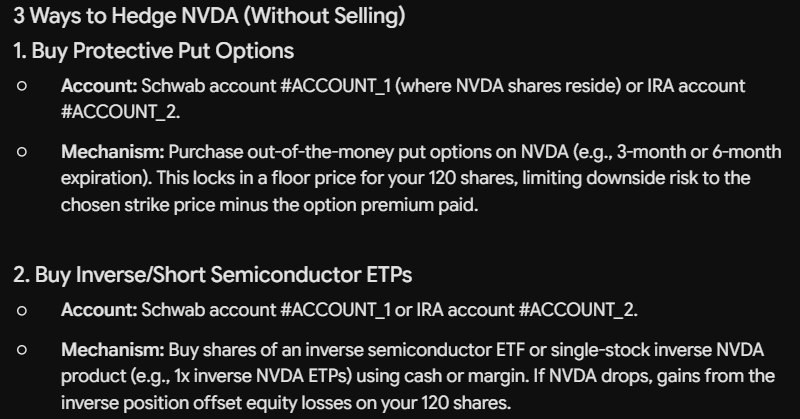
- Hedging ideas for a big position: protective puts, collars, covered calls, inverse ETFs.
Statements and screen copies usually carry your full name, mailing address and account numbers, sometimes the last digits of your SSN too. Once they're in a chat you can't take them back, and depending on the service and your settings, chats can be stored, reviewed by people or used to train the model.
What the AI actually needs
The ticker, the share count, the cost basis, the account type and your question. Nothing that identifies you or the account. So keep the numbers that matter and hush the ones that don't:
IRA account 2290-5513: $18,000 cash
Schwab account #ACCOUNT_1: 120 NVDA @ $88.40
IRA account #ACCOUNT_2: $18,000 cash
Because each account keeps its own hashtag for the whole chat, the AI can still say "sell covered calls in #ACCOUNT_1, keep the cash in #ACCOUNT_2", and you know exactly which account it means.
How to do it with Hushtag
- Copy your positions or statement text from your broker.
- Paste it into ChatGPT, Claude, Gemini or another AI chat as usual. Hushtag swaps your name, address, SSN and labeled account numbers for hashtags before the site receives them.
- Ask your question. The AI works with the hashtags.
- Press Alt+Shift+S to see the answer with your real account numbers back in, on your screen only.
Want something hushed every time, like your broker nickname for an account or a family member's name on a joint account? Add it once to "Always hush" in the Hushtag panel.
A few honest limits
- Hushtag hides who you are, not what you hold. Tickers, share counts and dollar amounts go through, because the AI needs them. If the size of a position would identify you on its own, round it.
- Hushtag catches account numbers that are labeled ("Account", "Acct", "IRA account", "Roth"...). A bare string of digits with no label may not be caught, so glance at the "hushed" note after you paste.
- Some AI apps can now connect straight to a brokerage. That data goes directly between the services and never passes through your paste, so Hushtag can't hush it. Decide separately whether you're comfortable with that.
- AI gets markets wrong, often confidently. Treat answers as a second opinion, not an order ticket.
Try it on your next trade idea
Try it free on our website, then add the Chrome extension for $4 a month to hush as you paste. Nothing is uploaded and there's no account.